
Recordings in. Process documentation out.
SuitePilot by TechBoss builds one process model from your recordings and documents, then writes the procedure, job aid, test scripts, training guide, requirements document and swimlane diagram from it.
Book a demo by email, or call us for an estimate.
Email: [email protected]
Phone: 647-725-9699
Proudly Canadian owned and operated
- Every step it extracts cites its source
- Nothing approved without a person
- Three processing options, including an on-site install
Four screens of the product, showing a fictional sample process
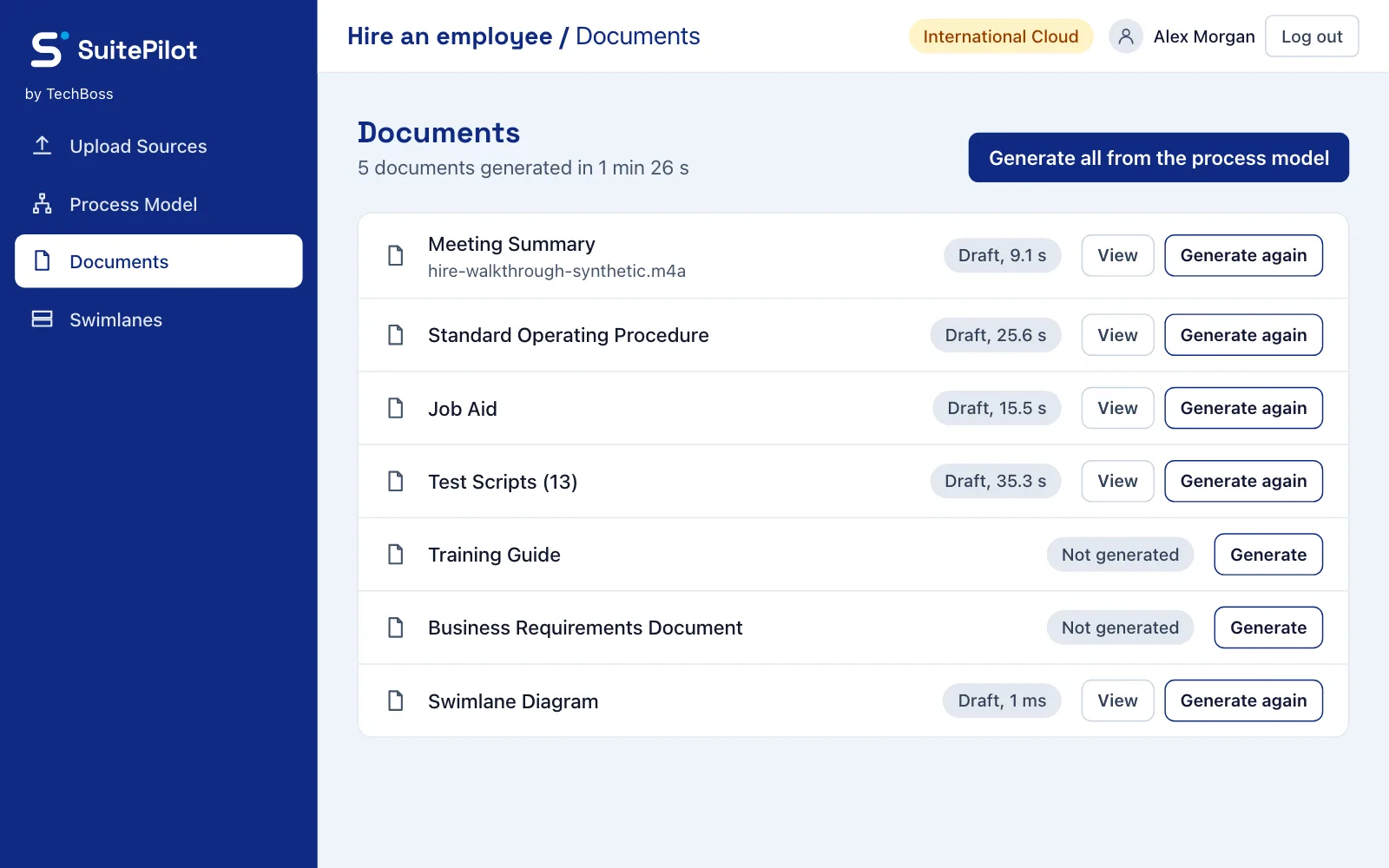
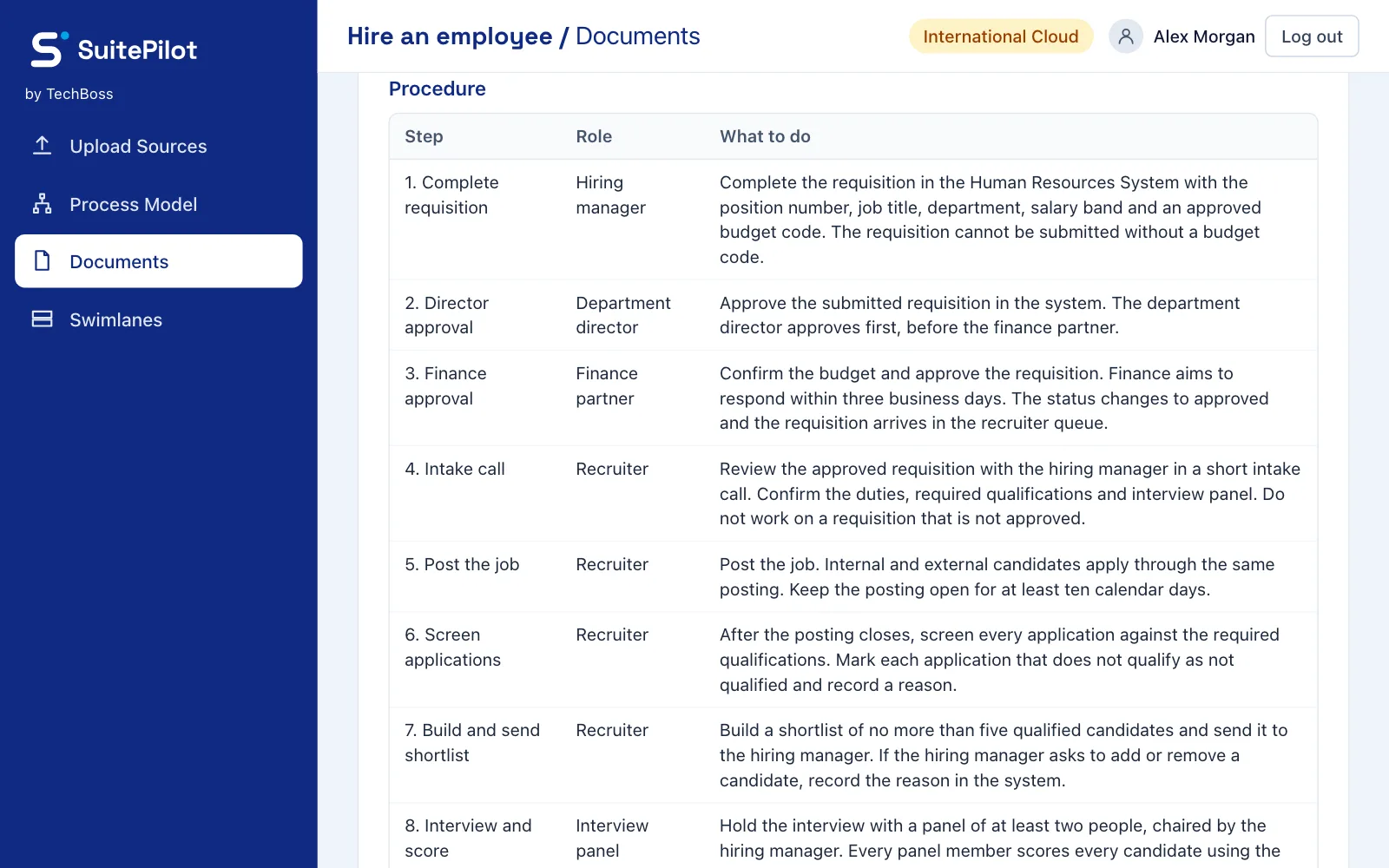
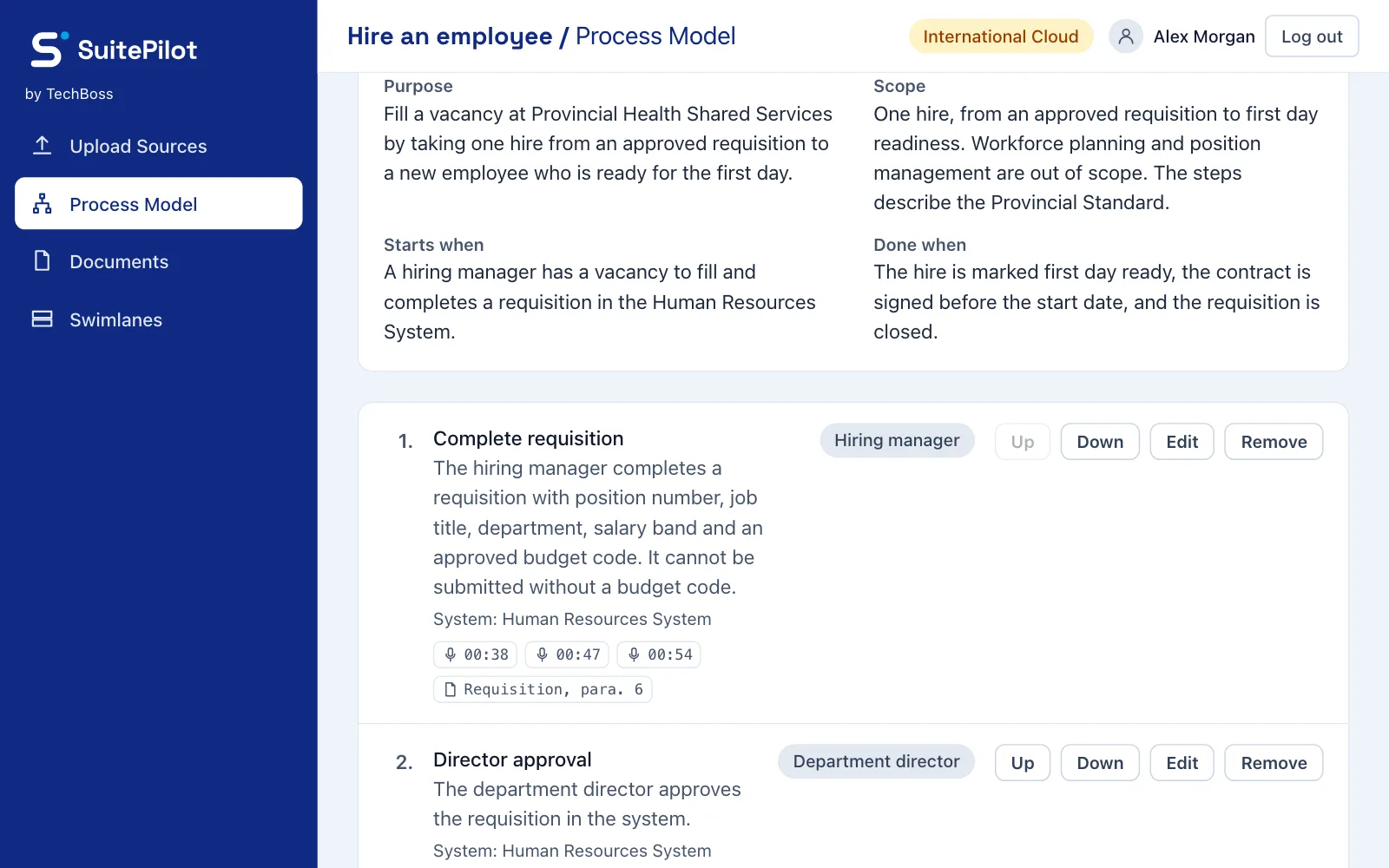
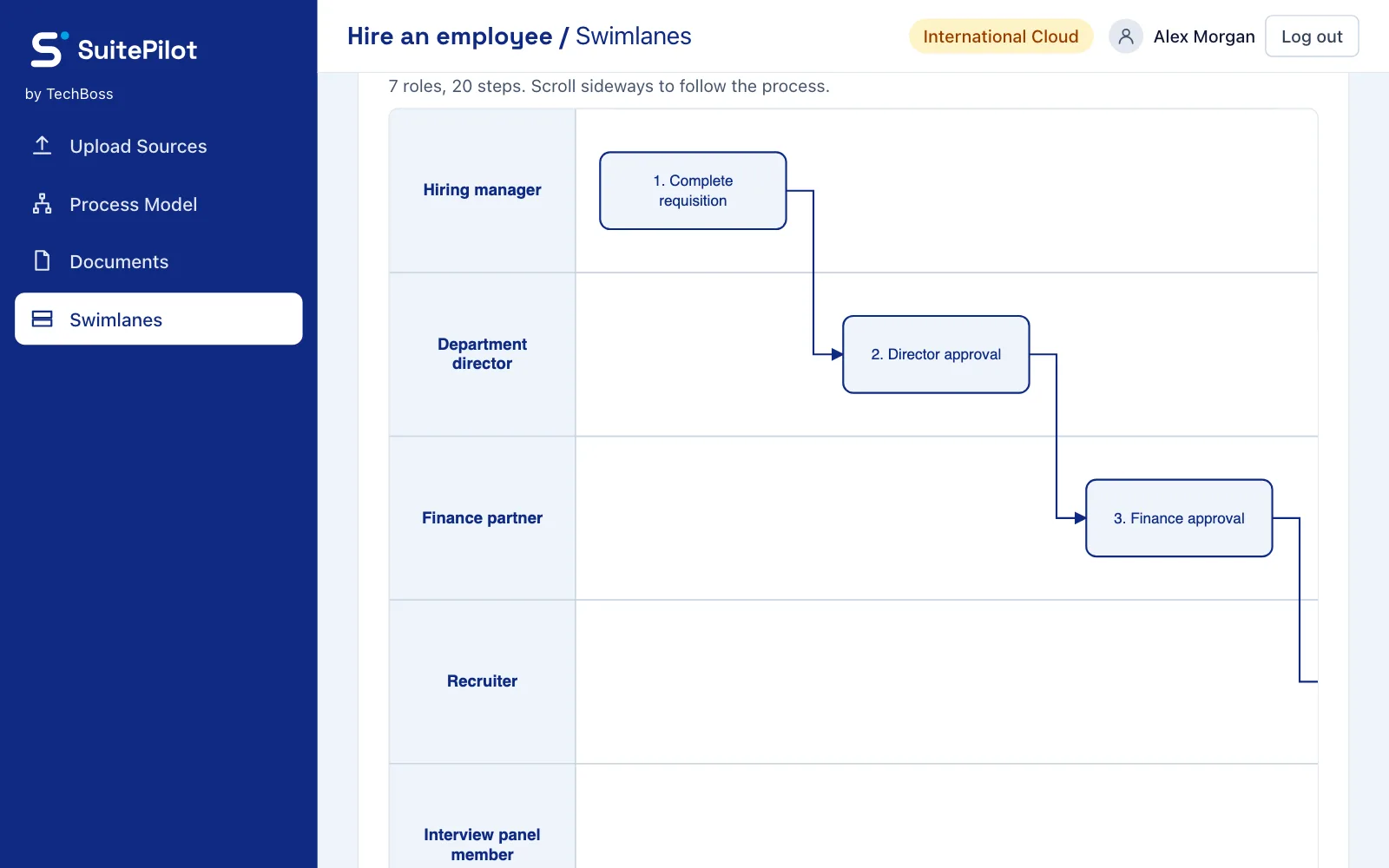
Real screens of the product. The process shown is a fictional sample.
What it produces
Six documents from one process model
Each one is written from the same process model. Change a step and the documents that depend on it show as out of date.
-
Standard Operating Procedure
Purpose, scope, roles, the numbered steps, decision points, exceptions and controls.
Exports to Word
-
Job Aid
The short version, written for the person doing the task.
Exports to Word
-
Test Scripts
Test cases written from the steps, the decision points and the exceptions.
Exports to Word and Excel
-
Training Guide
One guide for each role that performs a step.
Exports to Word
-
Business Requirements Document
Numbered requirements, one for every step and every business rule. A requirement taken from your sources names the passage it came from.
Exports to Word
-
Swimlane Diagram
One lane for each role and the steps in order, drawn from the process model.
Exports to SVG and PNG
How it works
Four steps, with a person in charge
-
Upload your sources
Add the recordings and documents that describe the process.
-
Check the process model
SuitePilot builds the process model and shows, under each step, the passage it came from. Where your sources are silent, you get an open question to answer.
-
Generate the documents
The procedure, job aid, test scripts, training guide, requirements document and swimlane diagram are written from that one model.
-
Review, approve, keep current
A person reviews and approves each document. Change a step later and the documents show as out of date; regenerate them and see what changed, before and after.
The price, explained
Why it costs more than a notetaker
A notetaker tells you what was said in a meeting. The costly work starts after that: someone has to turn it into a procedure, test scripts, training material and diagrams, and keep them in step when the process changes. SuitePilot does that writing, and a person checks it.
A meeting notetaker gives you
- A transcript of the meeting
- Notes of what was said
SuitePilot gives you
- A process model whose steps cite your sources
- Open questions where your sources are silent
- A Standard Operating Procedure and a Job Aid
- Test Scripts, in Word and Excel
- A Training Guide, with one guide for each role
- A Business Requirements Document
- A Swimlane Diagram
- Review and approval by a person
We print no figures for time saved, because we have not measured any yet.
Where the product stands
Built today, and coming soon
Built means it has passed our own test in the browser. Everything else is listed as coming soon until it does.
Built today, besides the six documents
-
Upload recordings and documents
Bring the recordings and documents that describe a process together in one place.
-
On-site transcription
With the on-site install, recordings are transcribed inside your own environment.
-
Speaker-named transcript
Identify the speakers of a recording and the transcript shows who said each passage.
-
A process model with open questions
SuitePilot builds one process model from your sources. Under each step it takes from them, it shows the place in the recording or the document and the passage itself. Anything the sources do not state is raised as an open question instead of being filled in.
-
Word export
Export the written documents as Word files.
-
Excel export of Test Scripts
Export the Test Scripts as an Excel file, with one row for each test step.
-
Late changes, handled
Edit a step and the documents show as out of date. Regenerate them and the wording that did not need to change is carried over, with a before and after view.
-
Review and approval
Every document starts as a draft. Only a person can approve it.
-
An audit log in plain sentences
Actions are recorded in an audit log written in plain sentences.
-
Processing options
International Cloud on the hosted product, Canada Cloud (available on request), and Localized as an on-site install. Each organization chooses one.
-
Chat view
Ask for a change in plain words. SuitePilot proposes it, and nothing changes until a person confirms.
-
Ask the Manuals
Ask a question and get an answer from your approved documents, with its source, or a plain statement that they do not cover it. Available with the on-site install.
-
Organization variants
Keep one process and show where each organization does it differently, each difference tied to its source.
-
Meeting summaries and action points
Decisions, action items and risks from a recording, each tied to the passage it came from.
-
Screenshots in guides
Add screenshots to a guide; the guide shows as out of date until it is written again with them.
Coming soon
These are planned and are not available yet.
- Meeting assistant Coming soon
- Dictation Coming soon
- User management with two-factor sign-in and passkeys Coming soon
- Single sign on Coming soon
- Multiple domains Coming soon
- User provisioning Coming soon
- Domain capture Coming soon
- Connections, including Workday Coming soon
- Client interface Coming soon
- In-app invoice billing Coming soon
Data protection
Three processing options
Each option says plainly where your data is stored and processed. Localized is not part of the hosted product: it is an on-site install.
-
Canada Cloud Available on request
Processing and storage in Canada, with data residency enforced.
-
International Cloud
Hosted on our server in Quebec, Canada, where your files are stored and recordings are transcribed. To write the documents, source text is sent to an AI model provider outside Canada, so this is not Canadian data residency.
-
Localized
An on-site install, not part of the hosted product: with it, your data never leaves your own environment.
Pricing
Priced per person, agreed by contract
SuitePilot is sold to organizations, not to individuals. There is no public price list: each organization agrees its price in its own contract.
-
Priced per person who uses it
The price depends on how many people in your organization use SuitePilot. It is agreed in your contract, so there is no public price list.
-
Sold to organizations, by contract
SuitePilot is set up for each organization under its own contract. There is nothing to buy on this site.
-
One processing option for your organization
Your organization chooses International Cloud on the hosted product, Canada Cloud (available on request), or Localized as an on-site install.
Questions
Frequently asked questions
What does SuitePilot do?
SuitePilot by TechBoss turns recordings and documents about a process into one process model, then writes a Standard Operating Procedure, a Job Aid, Test Scripts, a Training Guide, a Business Requirements Document and a Swimlane Diagram from that model.
How is SuitePilot different from a meeting notetaker?
A notetaker gives you notes of a meeting. SuitePilot writes the documents a process needs after the meeting: the procedure, the job aid, the test scripts, the training guide, the requirements document and the swimlane diagram, all from one process model that a person can check.
What happens when my sources do not state something?
It becomes an open question for a person to answer. SuitePilot is built to raise the gap instead of filling it in.
Can a document be approved without a person?
No. Every document starts as a draft, and only a person can approve it.
Where is my data processed?
That depends on the processing option your organization chooses. International Cloud: Hosted on our server in Quebec, Canada, where your files are stored and recordings are transcribed. To write the documents, source text is sent to an AI model provider outside Canada, so this is not Canadian data residency. Canada Cloud (available on request): Processing and storage in Canada, with data residency enforced. Localized: An on-site install, not part of the hosted product: with it, your data never leaves your own environment.
What happens when a process changes after the documents are written?
Edit the step. The documents show as out of date. When you regenerate them, the wording that did not need to change is carried over, and a before and after view shows what changed.
How much does SuitePilot cost?
SuitePilot is priced per person who uses it, and the price is agreed in a contract with each organization. There is no public price list. Call for an estimate for your organization.
How does an organization start?
Book a demo to see SuitePilot, or call for an estimate. SuitePilot is then set up for your organization under its own contract.
How do I book a demo or ask for an estimate?
Write to us at [email protected] to book a demo, or call 647-725-9699 for an estimate.
Which features are available today?
The features shown as built on this page have passed our own test in the browser. Everything marked coming soon is not available yet.
See what SuitePilot writes
Book a demo to see it turn recordings and documents into process documentation, or call for an estimate for your organization.
Book a demo by email, or call us for an estimate.
Email: [email protected]
Phone: 647-725-9699